Contra Costa County Property Tax Guide: Find Your Bill, Pay Safely & Avoid Penalties
Contra Costa property taxes are easier to handle when you follow the right order. Do not start by clicking a payment button. First confirm the parcel, check the APN or address, read the current bill, review the installment deadline, verify payment status, and then use the official Treasurer-Tax Collector system. This guide is written for homeowners, new buyers, escrow users, paperless billing users, and anyone trying to avoid late penalties, duplicate payments, wrong-parcel payments, or missed exemption and appeal deadlines.
Quick Answer
To manage Contra Costa County property taxes safely, use the official tax lookup portal to find the bill, confirm the Assessor’s Parcel Number, property address, bill year and installment, check whether a payment has already posted, review fees and deadlines, then pay through the Treasurer-Tax Collector’s official payment options. If the bill looks wrong, separate payment questions from assessment, exemption, supplemental bill, or appeal questions.
Start Here: What Do You Need to Do?
Use this table before you pay, call the wrong office, mail a check, file a form, or assume your mortgage company already handled the bill.
| Your Situation | Check First | Best Next Step |
|---|---|---|
| I need to find my tax bill | APN, street address, bill year, installment and payment status. | Find your bill online |
| I want to pay property tax | Current balance, fee, payment method, deadline and escrow status. | Follow the safe payment steps |
| I cannot find the property by address | APN, ParcelQuest Lite, parcel map and Assessor property details. | Use APN/address search |
| I want a PDF bill or online copy | Current bill, installment coupon, bill year and paperless billing options. | View or save the bill |
| My bill seems high | Assessed value, supplemental bill, exemptions, penalty and appeal window. | Review why it changed |
| I need an exemption or form | Homeowners’ Exemption, address change, value review and Assessor forms. | Open forms and exemptions |
How to Find Your Contra Costa County Property Tax Bill
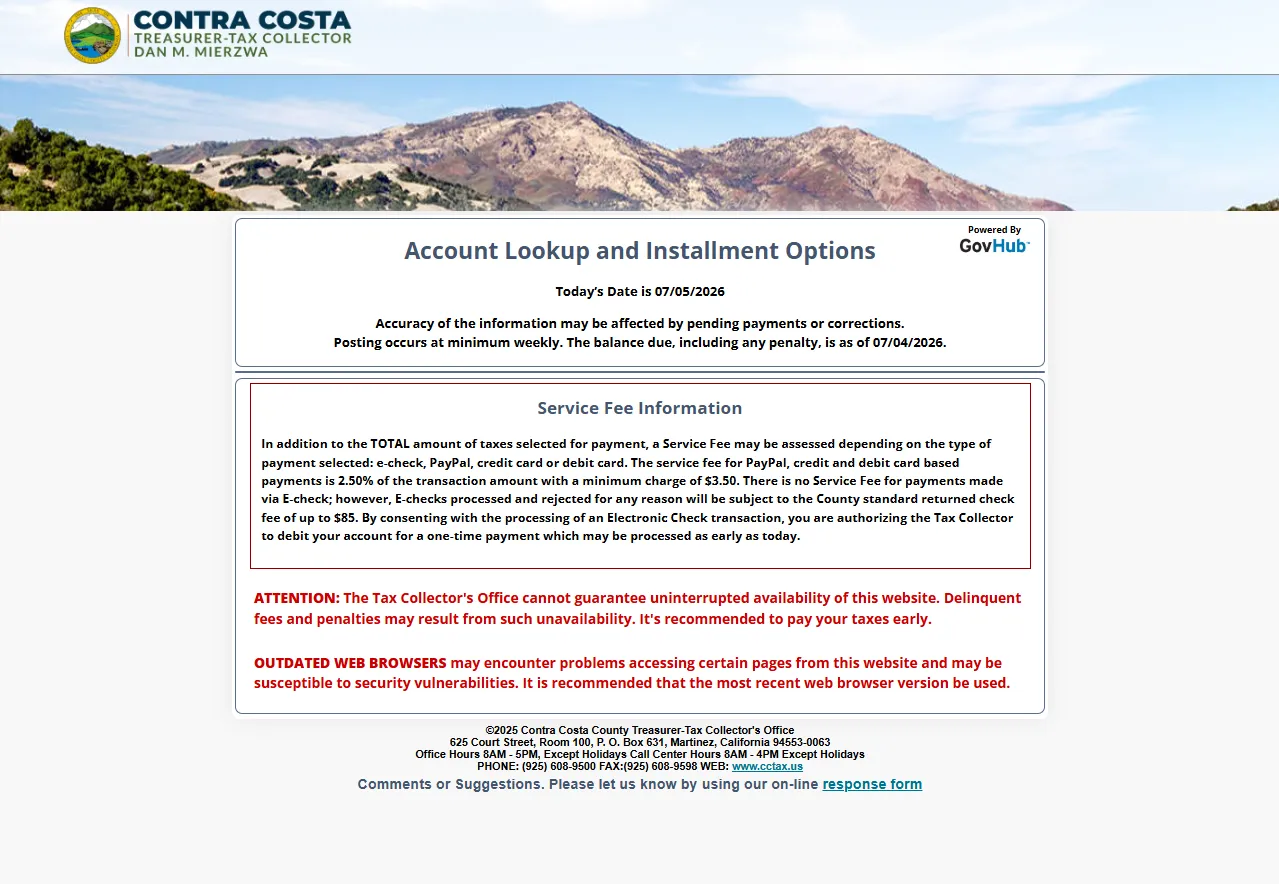
If the paper bill is missing, late, misplaced, or still going to an old address, do not wait until the delinquency deadline. The county tax portal lets property owners look up property tax details, pay online, schedule payments, sign up for Paperless Billing and review tax history. Missing mail does not remove the responsibility to pay by the deadline.
- Open the Contra Costa County tax lookup portal.
- Search using the method requested by the system.
- Confirm the property, APN, bill year and installment.
- Review tax history and payment status before paying.
- Save or print the bill if you need a copy for escrow, records or mailing.
Practical tip: If you did not receive a bill, contact the Treasurer-Tax Collector or look up an electronic copy online. Do this early because the portal itself warns taxpayers to pay early instead of waiting until the last day.
How to Pay Contra Costa County Property Tax
Payment should be the final step, not the first step. Before you pay, confirm the APN, property address, installment, balance, fee and payment status. This helps avoid duplicate payments, wrong APN payments, delayed posting, returned checks and avoidable penalties.
| Payment Method | Best For | Micro Steps | Official Link |
|---|---|---|---|
| Online e-check | Users paying from a checking or savings account. | Search bill → select installment → enter bank details → review → save confirmation. | Pay / Look Up Taxes |
| Card, PayPal or digital wallet | Users who prefer card-style payment and accept service fees. | Read fee notice → confirm amount → pay → save receipt. | Ways to Pay |
| Pay by phone | Users who want to pay without using a computer. | Have bill/APN ready → call official payment number → choose payment method → record confirmation. | Phone payment options |
| Users paying by check, cashier’s check or money order. | Use correct coupon → write APN if needed → do not mail cash → keep proof of mailing. | Treasurer-Tax Collector | |
| In person | Users needing a receipt or direct office help. | Bring bill/APN → confirm accepted payment type → keep receipt. | Office information |
| Scheduled payment | Users who want to schedule an installment payment through GovHub. | Look up bill → select schedule → create profile → set date → verify payment details. | Payment Scheduler |
Before you pay twice: If your mortgage company or escrow account usually pays the bill, check payment status first. A duplicate payment can create refund paperwork and delay.
Search Contra Costa County Property Tax by APN or Address
For property details, assessed values and parcel maps, the Assessor’s property information tools are the better starting point. ParcelQuest Lite lets users find property by Assessor’s Parcel Number or street address. Some vacant land parcels may not have street addresses, so an APN may be required.
- Open the Assessor Maps & Property Information page.
- Use the APN if you have it.
- Use street address search when APN is not available.
- Review parcel map, assessed values and property details.
- Return to the tax portal to review tax bill and payment status.
Best for exact parcel lookup, vacant land, old bills, escrow statements and official property records.
Best for homeowners who do not know the APN. Confirm the property carefully before paying.
Helpful when there are multiple parcels, vacant land, rural property, split parcels or similar addresses.
Useful when the bill looks high and you need to understand valuation before value review or appeal.
Contra Costa County Property Tax Due Dates
Annual secured property tax bills are mailed once a year by November 1 and paid in two installments using the coupons attached to the bill. The first installment is payable by November 1 and becomes delinquent after December 10. The second installment is payable by February 1 and becomes delinquent after April 10.
- Open the official Secured Property Taxes page.
- Confirm whether you are paying the first or second installment.
- Check the delinquency date and payment cutoff time.
- If a delinquency date falls on a weekend or holiday, confirm the next-business-day rule.
- Save payment proof before the deadline.
| Installment | Due / Payable Date | Delinquent After | What to Do |
|---|---|---|---|
| 1st installment | November 1 | December 10 | Pay before the delinquency cutoff and keep confirmation. |
| 2nd installment | February 1 | April 10 | Pay by the deadline to avoid a 10% penalty plus delinquent cost. |
| Both installments | Can be paid before first deadline | Each installment has its own delinquency date | Confirm both coupons and balances before paying together. |
| Weekend / holiday rule | Depends on calendar | May extend to next business day | Confirm the official deadline for the current year. |
Deadline warning: Website downtime or last-minute browser problems are not a safe excuse. The tax portal warns taxpayers to pay early because delinquent fees and penalties may result if a payment is not completed in time.
Paperless Billing and Online Tax Bill Access
Paperless Billing is useful if you travel, recently moved, manage multiple parcels, need a PDF copy, or want fewer mailed-paper problems. Contra Costa’s paperless system sends a free email notification that links to the online tax bill, where users can view, print and pay installments.
- Open the Paperless Billing registration or login page.
- Create a New User Profile if you are a new user.
- Add parcel numbers to the APN list.
- Watch for the email notification when secured tax bills are ready.
- Use the online bill to view, print, save or pay installments.
Use the online bill to save or print a PDF for your records, escrow file or mailing backup.
Paperless Billing can send reminders before delinquent dates when payments are still outstanding.
The email notification links to the online bill, where payment options are available.
Even paperless users can generally print the bill and pay by mail if they choose that route.
How to Get a Copy of a Contra Costa County Tax Bill
Copies of secured and supplemental tax bills can usually be found online through Account Lookup. Unsecured and redemption tax bill copies may require contacting or writing to the Treasurer-Tax Collector. Use the bill copy to confirm coupons, bill year, installment and APN before mailing or scheduling payment.
- Open Account Lookup from the tax portal.
- Search the property account or APN.
- Open the correct bill year and bill type.
- Print or save the bill copy for your records.
- If the copy is not available online, contact the Treasurer-Tax Collector using official office information.
Record tip: Save the bill with a file name like “Contra-Costa-Property-Tax-APN-2026-First-Installment.pdf” so you can find it later for escrow, refunds, appeals or tax records.
New Property Owner Checklist
New owners often receive confusing property tax mail because annual secured bills, supplemental assessments, escrow payments and mailing address changes can overlap. Contra Costa County’s fiscal tax year runs from July 1 through June 30, and the annual secured bill is paid in two installments.
- Confirm your mailing address with the Assessor if the bill goes to the wrong place.
- Look for the annual secured bill mailed once a year by November 1.
- Watch for supplemental assessment activity after a purchase or ownership change.
- Ask your lender whether escrow will pay annual and supplemental bills.
- Check posted payment status in the tax portal anyway.
New-owner mistake: Do not assume the title company, seller, or mortgage servicer will automatically handle every future bill. Annual secured bills and supplemental bills can arrive separately.
Why Did My Contra Costa County Property Tax Bill Change?
A higher bill does not always mean a payment error. It may be a valuation issue, a missing exemption, a supplemental assessment, changed mailing/payment timing, an unpaid installment, a penalty, or a tax-rate/assessment change.
| Possible Reason | Where to Check | Next Step |
|---|---|---|
| Assessed value changed | Assessor property information and assessed values. | Review property value and appeal/value review options. |
| Supplemental assessment | New-owner notices, Assessor notices and tax portal bill types. | Separate annual bill from supplemental bill activity. |
| Exemption missing | Assessor forms, Homeowners’ Exemption and exemption history. | File or correct records if eligible. |
| Payment not posted | Tax lookup/payment portal and escrow records. | Confirm posted payment before paying again. |
| Late payment penalty | Installment delinquency date and tax bill status. | Review balance and penalty details before payment. |
Contra Costa County Property Tax Exemptions and Forms
Property tax exemption and form questions usually belong with the Assessor, not the Tax Collector payment office. The Assessor forms page includes official forms such as Claim for Homeowners’ Property Tax Exemption, Change of Address, Request for Value Review and related property tax forms.
- Open the official Assessor forms page.
- Choose the form that matches your issue.
- Use the Homeowners’ Exemption form if the property is your principal residence and you qualify.
- Use value review forms if your property value appears above market conditions.
- Keep a copy of every form and proof you submit.
| Need | Official Form / Page | Use It When |
|---|---|---|
| Homeowners’ exemption | Claim for Homeowners’ Property Tax Exemption | The property is your principal residence and you need to claim the exemption. |
| Value review | Request for Value Review / Proposition 8 forms | You believe market value may be lower than the assessed value. |
| Mailing address change | Change of Address Form | Tax bills or Assessor notices are going to the wrong address. |
| Cancel exemption | Cancellation of Homeowners’ Exemption | The property is no longer your principal residence. |
Unsecured, Supplemental and Escape Assessment Issues
Not every Contra Costa tax bill is a regular annual secured bill. Unsecured taxes can involve property such as business property, boats, airplanes, possessory interests, improvements on land owned by others and some escape or supplemental assessment situations. These bills can have different payment, appeal and office-contact rules.
- Read the bill title and tax type before paying.
- Confirm whether the bill is secured, unsecured, supplemental, escape or redemption-related.
- Use the correct office page for that bill type.
- If the assessee name or property being assessed is wrong, contact the Assessor for review.
- Keep payment deadlines separate from appeal deadlines.
Assessment Appeals: When the Bill Looks Too High
If the issue is the value of the property, an appeal or value review may be more relevant than a payment call. Regular assessment appeals in Contra Costa County must be filed between July 2 and November 30 of each calendar year. Supplemental or escape assessments have separate timing rules, often tied to the notice or bill date.
- Confirm whether your issue is value-related or payment-related.
- Review the appeal filing window.
- Gather comparable sales, value evidence, photos or assessment documents.
- File with the Assessment Appeals Board if appropriate.
- Continue tracking payment deadlines separately.
Important: An appeal does not automatically erase a tax payment deadline. Official FAQ guidance says taxes still need to be paid by the due date to avoid penalties, liens and enforced collections; if taxes are reduced later, a refund may be issued.
Treasurer-Tax Collector vs Assessor: Which Office Handles What?
Many property tax problems take longer because the user contacts the wrong office. Use this table before calling or filing anything.
| Your Need | Start Here | Why | Official Link |
|---|---|---|---|
| Pay property tax | Treasurer-Tax Collector | Issues tax bills, collects payments and manages payment processing. | Treasurer-Tax Collector |
| Search property info | Assessor / ParcelQuest Lite | Shows parcel maps, APN, assessed values and property details. | Property Information |
| Homeowners’ exemption | Assessor Forms | Exemption claims and related forms are Assessor functions. | Assessor Forms |
| Assessment appeal | Assessment Appeals Board | Handles formal assessment appeal process. | Assessment Appeals |
| Tax rate issue on unsecured bill | Auditor’s Office / Property Tax Division | Official unsecured tax guidance points users to the Auditor’s Office if the tax rate is incorrect. | Unsecured Tax Information |
Mortgage Escrow Checklist
If your mortgage company pays your Contra Costa County property taxes, do not assume the county has received payment just because escrow money was collected. Escrow timing and county posting are separate events.
- Search the bill in the official tax portal.
- Check whether payment has posted for the correct installment.
- Compare the due date with your mortgage escrow statement.
- Contact your servicer if the deadline is close and payment is not posted.
- Do not pay yourself unless you understand the duplicate-payment risk.
- Keep your escrow statement and payment-status screenshot.
Documents to Keep
Good records help with payment questions, refunds, escrow confusion, missing exemption issues, supplemental bills and assessment appeals.
APN, property search result, current tax bill, installment coupon, payment status and escrow statement.
Confirmation number, receipt, bank record, check image, phone confirmation, scheduled-payment proof or office receipt.
Homeowners’ exemption form, address-change form, proof of residency, Assessor correspondence and submission confirmation.
Assessment notice, property details, comparable sales, photos, application copy and filing receipt.
Related Property Tax Guides on CountyPropertyTaxes.us
Use these internal guides for broader property-tax context, California property tax basics, official-source safety and independent-site disclaimers.
Official Contra Costa County Property Tax Links
Use these official sources when you are ready to look up a bill, pay, schedule a payment, register for paperless billing, review due dates, file forms or review appeals.
Contra Costa County Tax Office Map
For in-person payment or tax bill help, check the official office information before visiting. Bring your APN, bill, payment coupon and supporting documents.
Contra Costa County Treasurer-Tax Collector
625 Court Street, Room 100
Martinez, CA 94553
Phone: 925-608-9500
Call Center Hours: 8 AM – 4 PM, except holidays
Office Hours: 8 AM – 5 PM, except holidays
Editorial Trust and Update Notes
CountyPropertyTaxes.us is an independent informational guide. It is not Contra Costa County, the Treasurer-Tax Collector, the Assessor or the Assessment Appeals Board. This page is designed to help users understand the process before taking official action.
Update checklist: due dates, penalties, fee language, e-check/card payment rules, payment scheduler instructions, paperless billing links, Assessor forms, appeal windows, office address, official links and FAQ answers should be reviewed whenever Contra Costa County updates its pages.
Contra Costa County Property Tax FAQs
How do I look up Contra Costa County property taxes?
Use the official tax lookup portal to search your property tax bill and review tax history, payment status, installment options and online payment choices.
Can I search by APN or address?
Yes. The Assessor’s ParcelQuest Lite tool supports search by Assessor’s Parcel Number or street address. Vacant land may require an APN because not every parcel has a street address.
When are Contra Costa County secured property taxes due?
The first installment is payable by November 1 and becomes delinquent after December 10. The second installment is payable by February 1 and becomes delinquent after April 10.
How do I pay Contra Costa County property tax online?
Open the official tax lookup/pay portal, search your bill, select the correct installment, review any fee, then pay by e-check, card, PayPal, digital wallet or another accepted method.
Is there a fee to pay online?
The official portal shows service fee information before payment. It states that PayPal, credit and debit card payments have a 2.5% service fee with a $3.50 minimum, while e-check terms are shown in the portal’s fee notice.
Can I schedule a property tax payment?
Contra Costa County provides payment scheduling through GovHub. Search the bill, select the installment, create or sign into a GovHub profile, choose the payment date and verify payment details before submitting.
What if I did not receive my property tax bill?
Look up the bill online or contact the Treasurer-Tax Collector. Missing a mailed bill does not remove the responsibility to pay by the deadline.
How do I get paperless billing?
Use the county’s Paperless Billing registration page. The free email notification links to the online tax bill where you can view, print and pay installments.
Where do I find homeowners’ exemption forms?
Use the Contra Costa County Assessor Forms page and look for the Claim for Homeowners’ Property Tax Exemption form.
What if my property value seems too high?
Review assessed values through the Assessor tools, consider value review forms and check assessment appeal deadlines.
When can regular assessment appeals be filed?
Regular assessment appeals must be filed between July 2 and November 30 of each calendar year. Supplemental or escape assessments have separate timing rules.
Does an appeal stop the payment deadline?
No. Payment and appeal timelines should be handled separately. If a value appeal later reduces the taxes, the county may issue a refund according to official rules.
What is the difference between Treasurer-Tax Collector and Assessor?
The Treasurer-Tax Collector handles bills, payments, payment status and collection tasks. The Assessor handles parcel information, assessed values, exemptions and many property record forms.
Is CountyPropertyTaxes.us the official Contra Costa County tax office?
No. This is an independent informational guide. Final payments, forms, appeals and official records should be completed through Contra Costa County’s official systems.
Bottom Line
Find the bill, confirm the APN or address, check the installment and deadline, review payment fees, verify escrow/payment status, then pay, schedule, file or appeal through the correct official Contra Costa County source.
Find My BillHow to PaySearch PropertyDue DatesOfficial Links