
Montgomery County Property Tax Guide: Find Your Bill, Pay Safely & Check Maryland Credits
Montgomery County property tax questions often start with a missing bill, an escrow payment, a due date, or a saved PDF that may no longer show the live balance. This guide explains the full process before you pay: how to search by bill number, account number, or address; how to read the tax bill; which payment method fits your situation; how due dates work; when Maryland SDAT is needed; and which credits may lower the amount for eligible homeowners.
Quick Answer
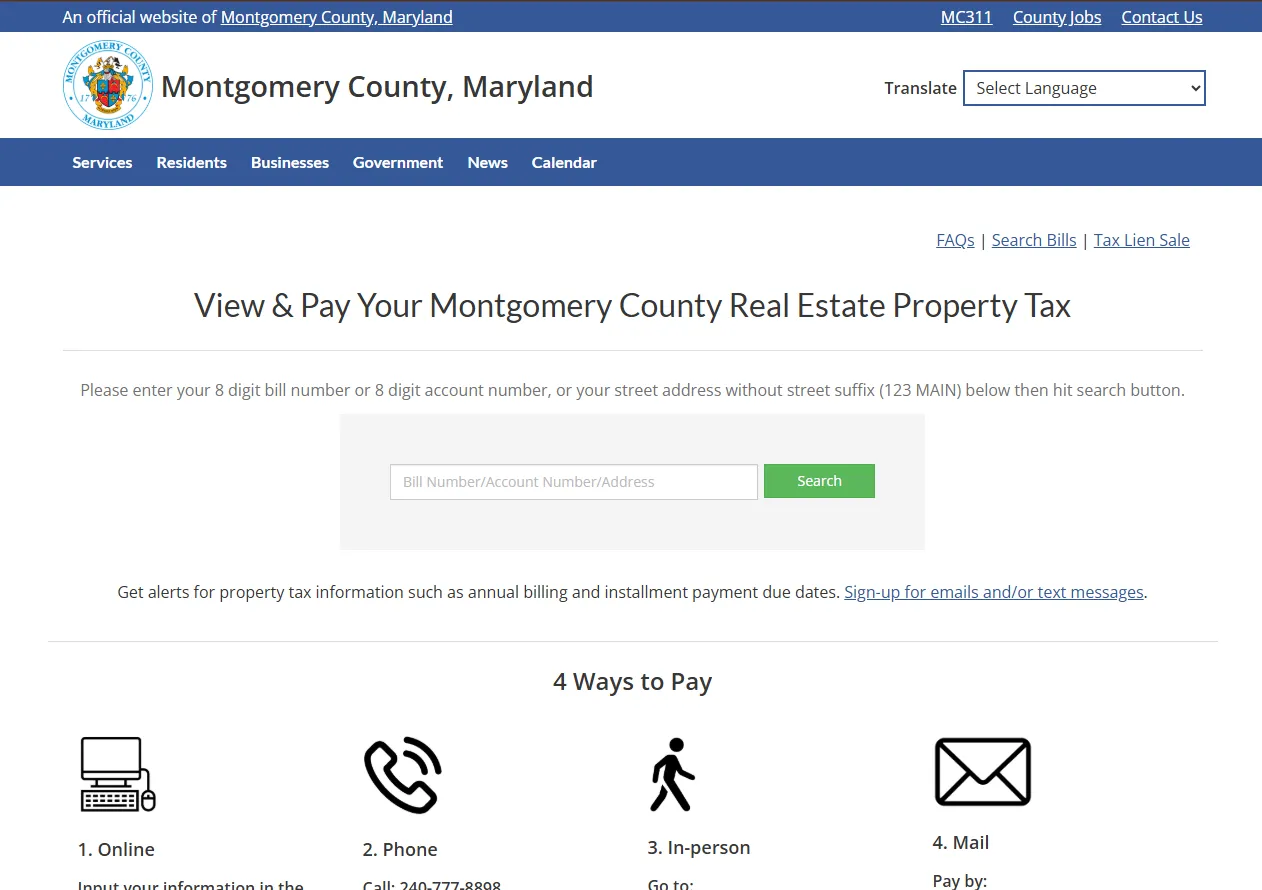
Use the official Montgomery County real property tax portal to search by 8-digit bill number, 8-digit account number, or street address without the street suffix. Confirm the property, open the current bill, check payment status and due date, then pay by electronic check, card, phone, mail, or in person. Use Maryland SDAT separately when you need assessment data, Homestead status, property credit information, or owner/property record details.
Start Here: Match Your Problem to the Right Tool
Search results often mix county payment pages, SDAT assessment pages, tax credit applications, third-party calculators, and general tax advice. Use this map first so you do not enter payment details too early or open the wrong office.
| Your Goal | Best Starting Point | Prepare This | Next Section |
|---|---|---|---|
| Find or pay the bill | Montgomery County real property tax portal. | 8-digit bill number, 8-digit account number, or property address. | Find bill |
| Check if payment posted | County bill/payment portal and MC311 payment status guidance. | Payment confirmation, bank/card record, escrow statement, bill or account number. | Payment status |
| Understand due dates | Current bill and MC311 due-date guidance. | Bill type: annual, semi-annual, supplemental, or revised. | Due dates |
| Research property assessment | Maryland SDAT Real Property Search. | Address, street name, account identifier, or map reference. | SDAT search |
| Lower tax with a credit | Maryland SDAT credit programs. | Residence status, income/net worth records if applying for Homeowners’ Credit. | Credits |
| Estimate a future tax bill | Montgomery County estimated real property tax calculator. | Property address or account number. | Estimate |
Before You Pay: 7 Checks That Prevent Most Montgomery County Tax Problems
The safest payment is the one made after the account is verified. Do these checks before using online payment, phone payment, mail, or in-person payment.
How to Find Your Montgomery County Property Tax Bill
If you do not have the paper bill, start with the county’s official real property tax portal. The portal asks for an 8-digit bill number, an 8-digit account number, or a street address without the street suffix. This is the best first stop for current bill lookup, payment, balance review, and payment method selection.
- Open the Montgomery County real property tax portal.
- Enter the 8-digit bill number if you have the printed bill.
- Use the 8-digit account number if you know the tax account.
- If you only know the property location, enter the street address without suffix, such as “123 MAIN” instead of “123 Main Street.”
- Confirm the property before opening bill, payment, or balance details.
Search tip: If the address does not return the expected result, remove street suffixes and direction words, then try again. If several results appear, compare account number, property location, and SDAT data before paying.
Best when you have a printed tax bill or PDF bill and want to open that specific bill quickly.
Best when you know the 8-digit property tax account but do not have the current paper bill.
Best when the bill/account number is missing. Remove suffixes and abbreviations for better results.
The county portal includes signup for property tax alerts such as annual billing and installment payment due dates.
How to Pay Montgomery County Property Tax Safely
Montgomery County lists four main payment routes: online, phone, in person, and mail. The right method depends on whether you want the fastest electronic route, a phone option, a physical receipt, or a mailed check record.
| Payment Method | What to Know | Micro Steps | Official Link |
|---|---|---|---|
| Online electronic check | Listed as no fee. Use checking/bank information after confirming the bill. | Search bill → confirm account and balance → choose electronic check → enter bank details → save confirmation. | Pay online |
| Online credit/debit card | Online card payments carry a 2.3% service fee that is not collected by Montgomery County and is not refundable. | Search bill → review fee → confirm amount → enter card → save receipt. | Pay by card |
| Phone payment | Official page lists phone payment at 240-777-8898, with electronic check no fee and card fee listed separately. | Have bill/account details ready → call official number → follow prompts → record confirmation. | View phone payment details |
| In-person payment | Official office listed at 27 Courthouse Square, Suite 200, Rockville, MD 20850. Money orders are not accepted. | Bring bill/account details → confirm accepted payment type → pay → keep receipt. | View office payment details |
| Mail payment | Mail checks with the payment slip from the bottom of the tax bill. Money orders are not accepted. | Print bill/payment slip → write check correctly → mail early → save copy and tracking if used. | View mail instructions |
Payment timing warning: Montgomery County says property taxes are not considered paid until funds clear the county’s bank account. Do not rely only on a scheduled payment screen, postmark, or bank bill-pay request. Confirm the payment posted to the county account.
How to Read the Montgomery County Property Tax Bill PDF
The official bill PDF is more than a printable copy. It shows the account number, bill number, levy year, billing period, amount due, amount paid, payment instructions, and the return portion/payment slip that may be needed for mailed payment. Reading these details before paying helps avoid wrong-account payments and duplicate payments.
- Find the account number and compare it with the online portal result.
- Check the bill number and levy year so you do not pay the wrong tax year.
- Look for the tax period, such as a July 1 to June 30 billing period.
- Review annual amount due, semi-annual installment, amount paid, and unpaid balance.
- If mailing payment, return the payment portion/slip with the check.
- Make the check payable exactly as the county payment page instructs.
| Bill PDF Area | Why It Matters | Action Before Paying |
|---|---|---|
| Account number | Connects the payment to the correct property account. | Match it with the online bill page and SDAT record if needed. |
| Bill number | Used for county bill search and payment lookup. | Use the 8-digit bill number when searching the portal. |
| Levy year / tax period | Shows which tax year or billing period the bill covers. | Do not use an old PDF for a new payment. |
| Amount due / amount paid | Shows whether the bill has an unpaid amount or prior payment. | Check live balance if the PDF was saved earlier. |
| Return portion/payment slip | Helps the county apply a mailed payment to the correct account. | Include it with mailed payment if required. |
Saved PDF warning: A bill PDF can become outdated after a payment, corrected bill, revised bill, credit update, escrow payment, or balance change. Always confirm the live online balance before sending money.
How to Check Balance, Recent Payments and Duplicate Payment Risk
If you recently paid online, by phone, by bank bill pay, by mail, or through mortgage escrow, do not send a second payment until the account status is clear. A payment can take time to clear and appear. A duplicate payment can create refund delays and more paperwork.
- Open the county real property tax portal.
- Search by bill number, account number, or street address.
- Review balance and any posted payment information.
- Compare with your bank, escrow, card, phone, or mailed-payment proof.
- If a recent payment is not reflected, confirm with your financial institution and then contact MC311 or county help if needed.
Escrow collection and county posting are not the same. Confirm that the lender’s payment actually posted.
Keep the confirmation number and check the county balance before paying again.
Because payment depends on cleared funds, send early and keep tracking or proof.
Bank bill-pay can look complete in your bank account before the county account shows the payment.
Montgomery County Property Tax Due Dates
Montgomery County property tax due dates depend on bill type. Regular annual bills and semi-annual first installments are generally due September 30. Semi-annual second installments are generally due December 31. Supplemental and revised tax bills generally have a 30-day deadline from the bill date.
- Check whether your bill is annual, semi-annual, supplemental, or revised.
- Read the exact due date printed on the current bill.
- Compare it with MC311 due-date guidance.
- For mailed payments, send early enough for funds to clear and the county to receive payment before the deadline.
- Do not assume a postmark protects you unless the official current instructions say so.
| Bill Type | Due-Date Guidance | What to Do |
|---|---|---|
| Annual tax bill | Generally due September 30. | Confirm the exact date on the current bill before paying. |
| Semi-annual first installment | Generally due September 30. | Pay or verify escrow before the first deadline. |
| Semi-annual second installment | Generally due December 31. | Check balance and status before sending a second payment. |
| Supplemental or revised bill | Generally due 30 days from the bill date. | Read the bill date carefully; do not assume the regular schedule applies. |
Annual vs Semi-Annual Payments and Mortgage Escrow
Maryland’s semi-annual payment guidance is especially useful for homeowners with escrow accounts. For a primary residence, property taxes may be paid in two installments, but a homeowner may also be billed annually depending on circumstances and elections. Mortgage servicers often manage this timing through escrow, so a homeowner may see escrow analysis changes that are not the same as a tax refund from the county.
- Check whether your bill is annual or semi-annual.
- Compare the tax due dates with your escrow statement.
- Do not pay the county yourself unless you confirm the mortgage company has not paid or will not pay.
- If your escrow analysis shows a surplus or shortage, contact your mortgage servicer first.
- Keep the escrow statement and county payment status screenshot.
Escrow warning: A mortgage company may collect taxes monthly and still pay the county later. Confirm the county posting before assuming the tax bill is handled.
Maryland SDAT Property Search: Assessment Details vs County Bill Payment
Use Montgomery County’s portal for tax bill payment, balance, and bill search. Use Maryland SDAT Real Property Search for assessment and property data. SDAT’s instructions say users can search by address, street name, account identifier, or map reference, but not by owner name, town, neighborhood, subdivision, or ZIP code.
- Open Maryland SDAT Real Property Search.
- Select Montgomery County when prompted.
- Search by address, street name, account identifier, or map reference.
- Do not search by owner name; official instructions do not support owner-name search.
- Compare SDAT property data with the county tax bill if the bill amount looks wrong.
| Tool | Best For | What Not To Do |
|---|---|---|
| County bill/account search | Paying, checking current tax balance, finding the bill, and reviewing payment options. | Do not use it as a full assessment appeal explanation. |
| SDAT assessment search | Assessment, property identification, account details, and tax credit research. | Do not use it for owner-name search because official instructions say owner-name search is not supported. |
| Map reference/account identifier | Helpful when address search brings multiple results or the property has unusual addressing. | Do not guess the account if several similar records appear. |
How to Estimate Montgomery County Real Property Tax
Buyers and homeowners should not assume the current owner’s tax bill will be their future bill. Credits, assessment changes, district charges, and non-tax charges can affect the amount. Use the county estimator for planning, then rely on the official bill for payment.
- Open the Montgomery County estimated real property tax calculator.
- Enter the property address or account number.
- Review estimated property tax and related charges.
- Use the estimate for planning, not as a payment bill.
- For a final amount, always use the current official tax bill.
Maryland Property Tax Credits for Montgomery County Homeowners
Many people search for “exemptions,” but in Maryland two important homeowner relief topics are the Homestead Property Tax Credit and the Homeowners’ Property Tax Credit. They solve different problems, so check the right one before filing.
| Program | Who Should Review | Important Detail | Official Link |
|---|---|---|---|
| Homestead Property Tax Credit | Homeowners using the property as a principal residence. | It limits taxable assessment increases for eligible principal residences and uses a one-time application/status process. | Check / Apply Homestead |
| Homeowners’ Property Tax Credit | Homeowners seeking income-based property tax relief. | The 2026 application form lists an October 1, 2026 filing deadline and requires ownership/residence/income information. | Review Homeowners’ Credit |
| SDAT tax credit portal | Owners ready to apply or check status. | Online filing can be faster and helps with status updates when available. | Open Tax Credit Portal |
Homeowners’ Tax Credit PDF details to check
The 2026 Homeowners’ Property Tax Credit form asks for household, income, residence, property, and supporting information. It also explains that the program is for homeowners who qualify based on gross household income and that eligible taxes do not include some fixed charges or business-use portions.
- Use the current tax year application, not an old PDF.
- Review whether the property is your principal residence for the required period.
- Prepare identity, household, income, property, and supporting information before applying.
- Use online filing if you want faster filing and status updates.
- Do not delay paying the tax bill unless the official program instructions clearly apply to your situation.
Why Did My Montgomery County Property Tax Bill Change?
A changed tax bill can come from the assessment, a credit status change, a different payment schedule, a revised or supplemental bill, non-tax charges, or payment timing. Before assuming the amount is wrong, compare the county bill, SDAT record, and credit status.
| Possible Reason | Where to Check | Next Step |
|---|---|---|
| Assessment changed | Maryland SDAT property record. | Compare assessed value, property details, and prior record. |
| Credit not applied | Homestead and Homeowners’ Credit portals. | Check eligibility, filing status, and deadlines. |
| Semi-annual payment split | Bill type and due-date section. | Confirm whether first or second installment remains due. |
| Supplemental or revised bill | Bill date, bill type, and current balance. | Use the 30-day due-date rule if applicable. |
| Recent payment not reflected | County payment page, bank record, and confirmation. | Allow processing time and avoid duplicate payment. |
Mail and In-Person Payment Details
Mail and in-person payments are useful when you need paper records or cannot use online payment. Read the official payment page before mailing because Montgomery County lists specific check, payment slip, address, fee, and money order instructions.
Mail checks with the payment slip from the bottom of the tax bill to Montgomery County, MD, P.O. Box 5561, Binghamton, NY 13902-5561.
The official portal lists the property tax payment office at 27 Courthouse Square, Suite 200, Rockville, MD 20850.
Card payments include service fees. The fee is not collected by Montgomery County and is not refundable.
The county payment page says money orders are not accepted for mail or in-person payment.
If You Just Bought a Montgomery County Property
New buyers should not assume the prior owner’s bill, credit status, or escrow handling will match their future bill. Credits, settlement adjustments, ownership updates, and SDAT records can all affect what you should review.
- Search the county tax portal by address or account number.
- Compare the tax bill with your closing statement and escrow setup.
- Check SDAT to confirm the assessment record and Homestead status.
- Apply or check Homestead status if the property is your principal residence.
- Review whether Homeowners’ Property Tax Credit may apply based on income rules.
- Do not assume a seller credit at closing means the county tax was paid.
Tax Lien Sale, Delinquent Balance and Urgent Notices
If your bill is late, delinquent, or connected to a tax lien sale notice, treat it as time-sensitive. Do not rely only on a saved bill or a third-party summary. Search the account, confirm the balance, and use county guidance before taking action.
- Search the property account in the county real property tax portal.
- Confirm whether the balance is current, late, or connected to a tax lien sale notice.
- Review official Montgomery County tax lien sale guidance.
- Keep all notices, payment records, and account screenshots.
- If a legal deadline, bankruptcy, estate, foreclosure, or ownership dispute is involved, get official or qualified professional help first.
Common Mistakes to Avoid
Saved PDFs can become outdated after a payment, revised bill, credit update, or balance change.
The county portal asks for street address without suffix. Remove words like Road, Street, Drive, Avenue, Lane, or Court.
Taxes are not considered paid until funds clear the county’s bank account.
If your mortgage company pays taxes, confirm county posting before sending your own payment.
Official SDAT instructions say owner-name search is not supported.
The estimated tax calculator is for planning only. It is not a final tax bill.
Helpful Related Guides on CountyPropertyTaxes.us
These internal guides help with general property tax concepts that apply beyond Montgomery County, including how assessed value works, why bills change, how credits reduce tax, and how to read a local tax bill.
Official Montgomery County and Maryland Property Tax Links
Use these official sources when you are ready to search, pay, estimate, apply for credit programs, or verify account-specific details.
Montgomery County Property Tax Office Map
For in-person payment or help with a real property tax bill, confirm current hours and accepted payment methods before visiting.
Montgomery County Department of Finance, Division of Treasury, Property Tax Section
27 Courthouse Square, Suite 200
Rockville, MD 20850
Phone: 240-777-0311
Editorial Trust and Update Notes
CountyPropertyTaxes.us is an independent informational guide. It is not Montgomery County Government, Maryland SDAT, MC311, or a tax office. This page is written to help users understand the process before taking official action.
Update checklist: search fields, payment fees, due-date guidance, no-postmark rule, mail address, office address, bill PDF details, Homestead rules, Homeowners’ Property Tax Credit dates, SDAT search instructions, tax lien sale links, internal links, and official links should be reviewed whenever county or state pages change.
Montgomery County Property Tax FAQs
How do I search Montgomery County property tax bills?
Use the official Montgomery County real property tax portal. You can search by 8-digit bill number, 8-digit account number, or street address without the street suffix.
How do I pay Montgomery County property tax online?
Search the bill in the county portal, confirm the property and balance, choose electronic check or card, review any fee, submit the payment, and save the confirmation.
What payment method has no fee?
The county payment page lists electronic check as a no-fee payment option. Credit and debit card payments have service fees.
Can I pay by phone?
Yes. The official payment page lists phone payment at 240-777-8898. Have your bill number, account number, or property details ready before calling.
What are Montgomery County property tax due dates?
Annual and semi-annual first-installment tax bills are generally due September 30. The second semi-annual installment is generally due December 31. Supplemental and revised bills are generally due 30 days from the bill date.
Does Montgomery County honor postmark dates?
The county payment page says taxes are not considered paid until funds clear the county’s bank account, so mailed payments should be sent early enough to arrive and clear by the deadline.
What should I check on the property tax bill PDF?
Check the account number, bill number, levy year, tax period, amount due, amount paid, and payment slip or return portion before paying.
Can I search Maryland property records by owner name?
No. SDAT’s official instructions say the Real Property database can be searched by address, street name, account identifier, or map reference, but not by owner name, town, neighborhood, subdivision, or ZIP code.
What is the Homestead Property Tax Credit?
The Maryland Homestead Tax Credit helps limit taxable assessment increases for eligible principal residences. Homeowners must submit a one-time application and meet program rules.
What is the Homeowners’ Property Tax Credit?
The Maryland Homeowners’ Property Tax Credit is an income-based property tax relief program. Eligible homeowners must apply and meet ownership, residence, income, and net worth rules.
Where can I estimate Montgomery County property taxes?
Use the official Montgomery County estimated real property tax calculator. It can help owners and buyers estimate real property taxes and related charges, but it is not the final bill.
What if my recent payment is not showing?
Check your payment confirmation and bank record first. Recent payment activity can take time to appear, so avoid making a duplicate payment until you verify the status.
What if my mortgage company pays my taxes?
Compare the county payment status with your escrow statement. Do not send your own payment unless you confirm the lender has not paid or will not pay.
What if I just bought the property?
Compare the tax bill with your closing statement, check the account in the county portal, verify SDAT records, and review Homestead or Homeowners’ credit status if the property is your principal residence.
Is CountyPropertyTaxes.us the official Montgomery County tax office?
No. This is an independent informational guide. Final payments, bill searches, tax credit applications, and official records should be handled through Montgomery County or Maryland SDAT official systems.
Bottom Line
Start with the county bill portal, confirm the account and property address, read the bill PDF, check the due date and payment status, review Maryland credits if eligible, then pay or apply through the official county or state source.
Find My BillHow to PayRead Bill PDFCheck CreditsOfficial Links